
| Purpose & Benefits |
|---|
| This utility is for use on the rare occasion where the summary database figures becomes “out of sync” with the underlying transactions and lets you run a recalculation of various Stock/Product Quantity figures. Sales Orders, for example, can become out of synch if TASBooks itself is used to create/edit and/or Print/Post Sales Orders. |
Important
Before running it you must ensure that all other users are logged out of this company, both in TASBooks and in any Infoplex software. You should also take a backup of the TAS data.
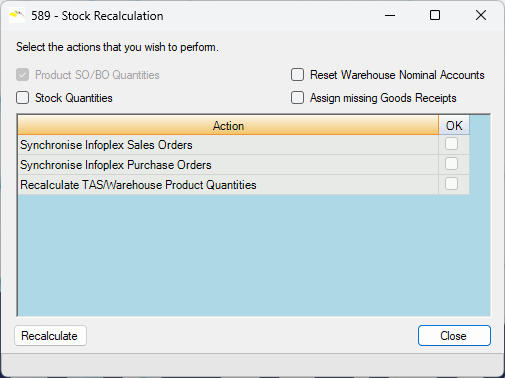
There are various ways you can run this:
- Reset Warehouse Nominal Accounts – update those Warehouse Product records which are different from the TAS NL accounts.
- Stock Quantities – akin to a full Recalculation which works through the entire history for each product.
- Assign missing Goods Receipts – please only run this option if directed to by Infoplex Support. If you choose to run this option anyway, please ensure ‘Stock Quantities’ checkbox is unchecked. Click Recalculate. Once this operation has completed, you then need to run this program again and tick the ‘Stock Quantities’ checkbox ONLY. Then click Recalculate.
When complete, review stock levels.
The amount of time taken to complete the Full Recalculation depends on the size of your database. If it is very large, you may wish to let it run outwith office hours, e.g. in the evening, overnight or over a weekend, so that business is not disrupted.
Click the Recalculate button to continue. Progress is indicated in the list of Processes, as the program automatically checks Stock movement assignments (matching with those in TAS), reassigns them and recalculates Product stock quantities at warehouses (but not TAS Product records’ quantities) plus related history. A similar process is carried out with Sales Orders (but not TAS Sales Order records) and Purchase Orders.
The Synchronise Sales Orders process checks that TAS Sales Orders are correctly matched with Infoplex records.
The Synchronise Purchase Orders process checks that TAS Purchase Orders are correctly matched with Infoplex records.
A Log file is created during this process to provide an overview of what was performed, any errors found etc. The log file is stored in the TASBooks data folder and it’s name begins ‘Recalculation’ followed by a date stamp.