| Purpose & Benefits |
|---|
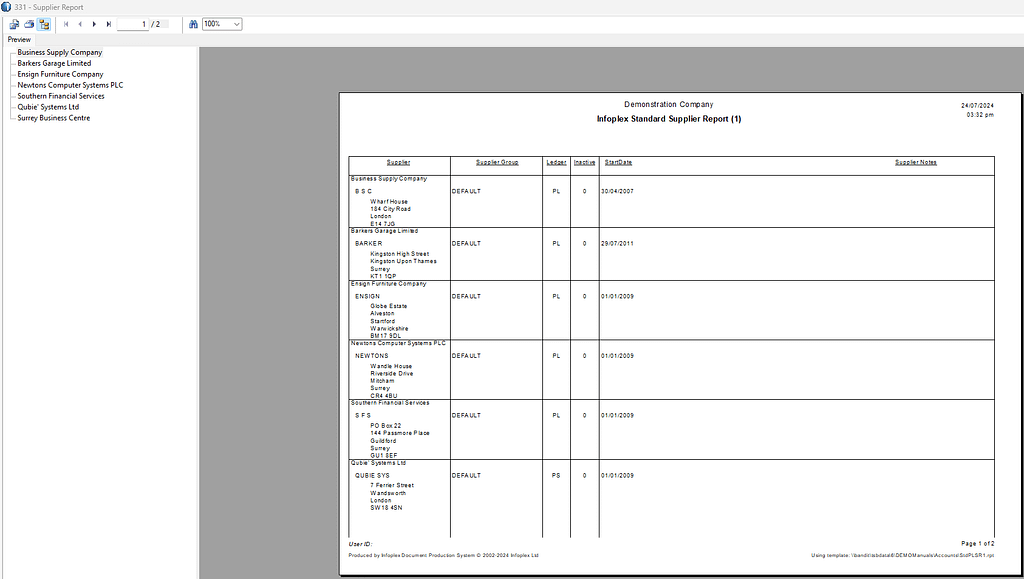
| This function lets you generate a report of open PL items using Templates for report layouts, which can also be exported to other file formats (CSV, Excel etc). A large range of filters are available to let you focus on various aspects of your TAS data. |
The process begins with giving you a comprehensive form with which to filter your customers:
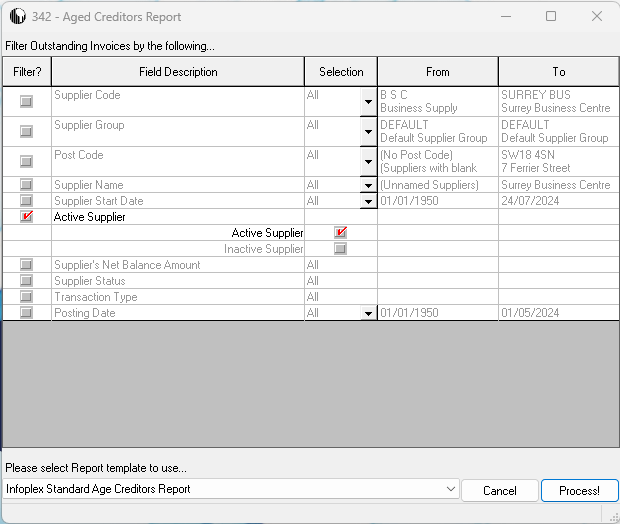
Filter Outstanding Invoices by the following…
This section narrows the report based on your selections. By default, no filters are applied except for the ‘Active Customers(/Suppliers) only’ one. You have 13 separate filter options:
| Filter | Options | Remarks/Notes |
|---|---|---|
| Supplier Code | All, Range or Single | |
| Supplier Group | All, Range or Single | |
| Post Code | All, Range or Single | Range or Single can start with blank in case no post code |
| Supplier Name | All, Range or Single | |
| Start Date | All, Range or Single | |
| Active Supplier | Active, Inactive or both | |
| Net Balance Amount | Credit (Negative) Net Balance, Zero Net Balance, Debit (Positive) Net Balance or all three | |
| Supplier Status | Customer/Supplier only, Customer and Supplier or both | |
| Transaction Type | Invoices only, Credit Notes only, Receipts only, Debits/Refunds/Bounced Cheques/Write-Backs only, Credits/Write-Offs/Contras only, any combination from these 5 options, or all types | |
| Posting Date | All, Range or Single | Dates can be within last 5 years or earlier |
Select Report Template to use:
Select from the drop down list the template you wish to use. To add or alter a template, see Document Templates in the Central menu. Click the Process button to produce a report which is displayed for preview.