| Purpose & Benefits |
|---|
| NOTE: This report was paid for and thus developed for a specific customer to their requirements so may not be for everyone. The Sales Order Delivery Schedule report gathers Sales Order information based on 2 custom MultiTAS Sales Order Entry fields – Driver and Driver Delivery Date. It reduces the potentially time-consuming processing of multiple Delivery Notes and Picking Lists into a couple of clicks. |
The easiest way to explain this report is to show an example.
Here’s 3 sample orders showing driver (could be van) details and delivery date in MultiTAS Order Entry. Note that these fields are hidden by default and need enabled in Maintain Central Information.



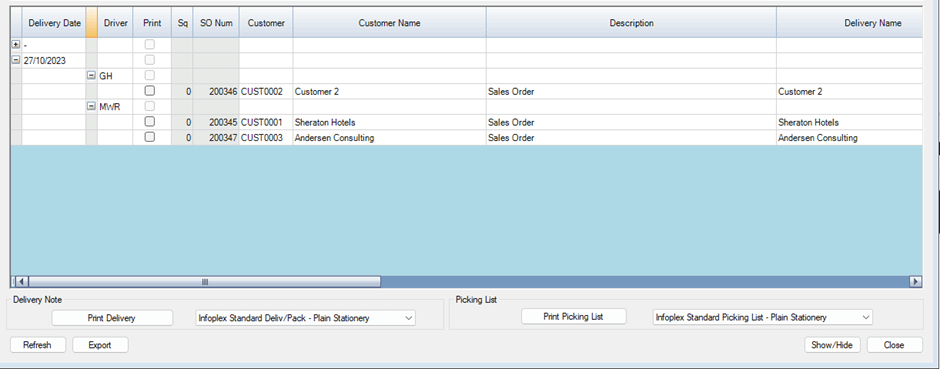
The report breaks down the list of orders based on the date value of the Driver Delivery field, as shown below.
You can see the Delivery Date (not this is a Custom field and not the Orders Expected Shipping Date) in the first column. Then the Drivers initials in the Driver column. Then the Order details are grouped underneath the displayed Driver.
You can easily print off picking lists and delivery notes for each order by ticking the ‘Print’ box. You can also choose which report template should be used from the provided dropdown.