
| Purpose & Benefits |
|---|
| This function lets you produce Customer Price Lists using pricing derived from the TAS prices combined with the Dynamic Discounts entered in TASBooks |
Important
This legacy feature bases Prices on Customer Dynamic Discounts.
This is in no way related to the MultiTAS Price Lists function.
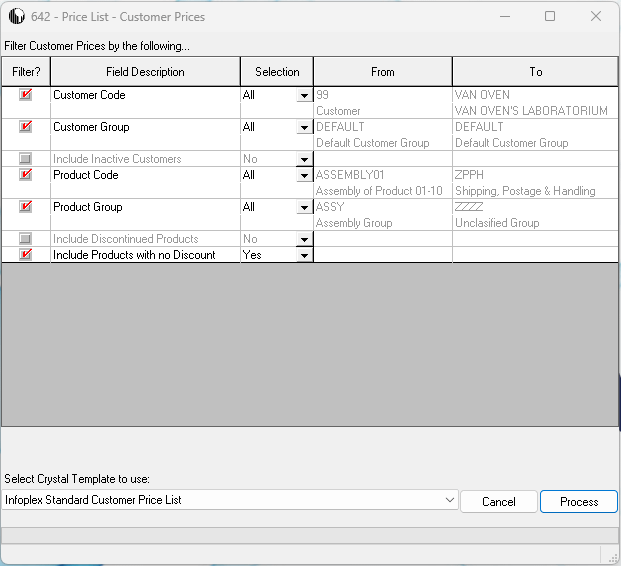
Filters
Decide which filters you want to apply to your report.
| # | Filter Field | Options | Remarks/Notes |
|---|---|---|---|
| 1 | Customer Code | All, Range, Single | If you select Single or Range, complete the From and To fields as required |
| 2 | Customer Group | All, Range, Single | If you select Single or Range, complete the From and To fields as required |
| 3 | Include Inactive Customers | Yes, No | Customers who have been flagged as Inactive |
| 4 | Product Code | All, Range, Single | If you select Single or Range, complete the From and To fields as required |
| 5 | Product Group | All, Range, Single | If you select Single or Range, complete the From and To fields as required |
| 6 | Include Discontinued Products | Yes, No | Products which have been flagged as discontinued |
| 7 | Include Products with no Discount | Yes, No | Products which have not been assigned a Dynamic Discount for the Customer(s) selected |
You can select which Template to use from the drop-down menu; remember you can add one or more extra templates using the Document Templates function in the Central > Central Information menu. Having completed your selections, simply click the Process button to run the report.
The report is displayed for you to preview and print/export as necessary.